
Every wall art design from Decor Glam Chic comes with 8 high-resolution print-ready sizes included in your download. This guide will help you choose the perfect size for any wall, any room, and any frame — so your art looks exactly the way you imagined it.
All files are delivered at 300 DPI resolution, which is the professional standard for sharp, beautiful print quality at every size listed below.
The 8 Sizes Included With Every Purchase
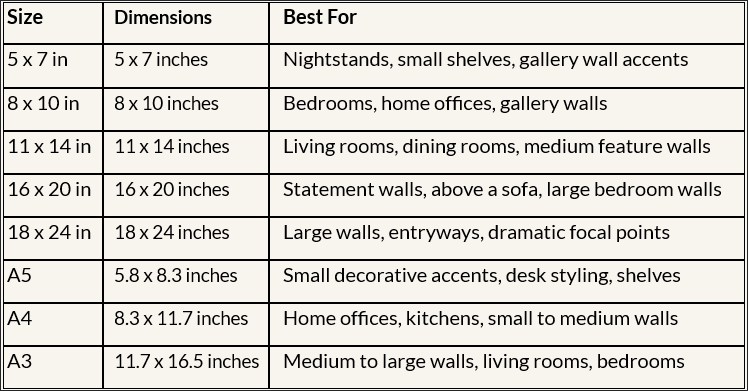
Which Size Is Right For Your Wall
Not sure which size to choose? Use this simple guide to find the perfect fit for every space in your home.
Small Walls and Tight Spaces: For a narrow hallway, a small wall section, or a cozy nook, choose 5 x 7 or 8 x 10 inches. These sizes work beautifully as a single accent piece or grouped together in a small arrangement.
Medium Walls: For a standard bedroom wall, a wall above a desk, or a dining room feature wall, choose 11 x 14 or 16 x 20 inches. These sizes make a confident, noticeable statement without overwhelming the space around them.
Large and Statement Walls: For a large living room wall, the wall above your sofa, or a dramatic entryway feature wall, choose 18 x 24 inches. This size commands attention and creates a true focal point in any room.
Gallery Walls: Gallery walls work best with a mix of sizes. A popular and proven combination is one 11 x 14 inch piece as the anchor in the center, two 8 x 10 inch pieces on either side, and two 5 x 7 inch pieces in the outer corners. Because every design in our store comes with all 8 sizes, you have everything you need to create a complete gallery wall from a single purchase.
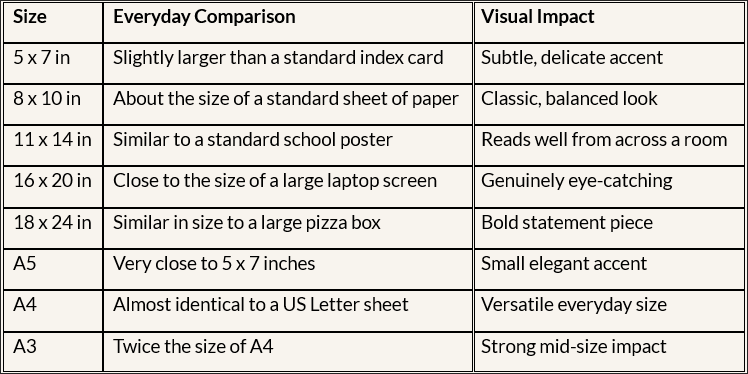
Size Comparison At A Glance
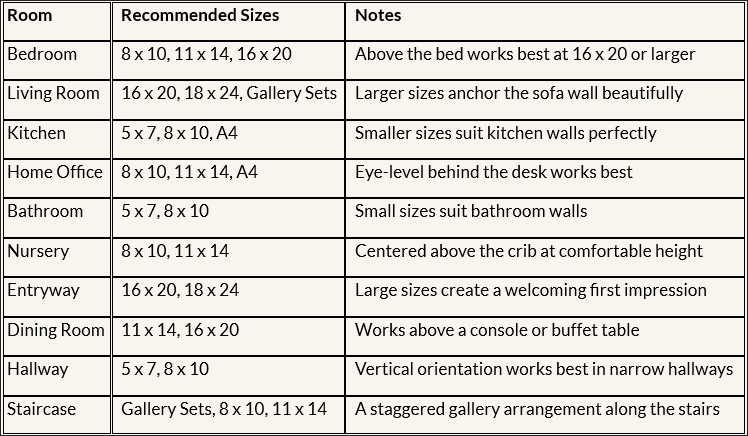
Which Size Works In Which Room
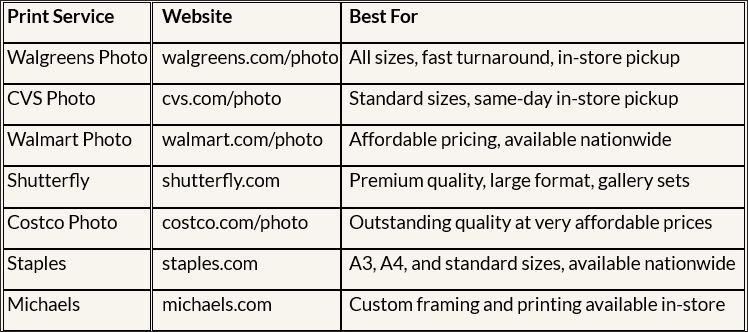
Where To Print Your Wall Art
Once you download your files you have several great options for printing your wall art in the USA.
Professional Print Services — Recommended
For the sharpest colors and best overall quality, we strongly recommend using a professional print service. Professional printers use calibrated equipment and premium paper that produces results far superior to most home printers, especially for larger sizes.
Printing At Home
You can print your wall art at home on any inkjet or laser printer. For the best results use bright white photo paper or premium matte paper rather than standard copy paper. Always set your printer to the highest available quality setting and print at 100% scale without any automatic resizing applied.
Please note that colors may appear slightly different from your screen when printed. This is completely normal and is caused by the difference between screen display colors and printed output colors. It is not a defect in your files.
Where To Buy Frames For Each Size
All 8 sizes are designed to fit standard frames that are widely available across the USA.
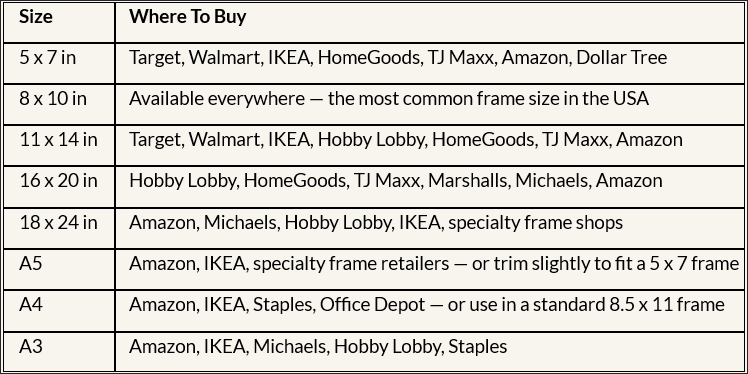
Pro Tip: Hobby Lobby runs 40% to 50% off frame sales regularly, making it one of the best places in the USA to find affordable frames for larger sizes. Sign up for their weekly coupon before you shop.
Tips For Getting The Best Print Results
Always print at 100% scale. Never let your printer automatically resize or fit your image to the page. Set your print dialog to Actual Size or 100% every time to ensure your print fills the correct dimensions.
Use the right paper. For the sharpest and most vibrant results use bright white photo paper or premium matte art paper. Avoid standard copy paper as it produces noticeably duller colors and less defined edges.
Select the highest quality print setting. In your printer or print dialog settings select the highest available quality option such as Best, Photo Quality, or High Resolution before printing.
Use a professional print service for sizes 16 x 20 and above. For larger prints, professional printing will almost always produce a significantly better result than home printing. The difference in quality is substantial and the cost is minimal.
Add a mat board for a gallery-quality look. A simple white or cream mat board placed inside your frame and around your print instantly elevates the finished look. Most frame retailers sell pre-cut mat boards or you can request custom cutting at Michaels or Hobby Lobby.
Let your print dry before framing. If printing at home on photo paper, allow your print to dry for at least 30 minutes before handling or placing it inside a frame to avoid any smudging or fingerprints on the surface.
Frequently Asked Questions
Can I print a size that is not included in my download? Yes. You can resize any of the included files slightly using free tools like Canva or Adobe Acrobat. For the best results when resizing, only go slightly larger than the original file size. Significant upsizing may reduce print sharpness.
What if my frame is a slightly different size than the file I downloaded? Most print services and home printers allow you to add a white border when printing to fit a slightly larger frame. Alternatively a mat board cut to the right dimensions will fill any small gap between your print and the frame opening.
Can I print the same design multiple times? Yes. Your personal use license allows you to print as many copies as you need for your own home. See our full Terms and Conditions for complete license details.
What file format should I use for printing? For the sharpest print quality use the PDF files included in your download whenever possible. PDF files preserve the full resolution of the artwork and produce the best results at professional print services. JPEG files are also suitable for home printing and online print uploads.
What if my printed colors look different from the screen? This is completely normal. Screens display colors in RGB mode and printers output in CMYK mode. The difference can be noticeable with warm and saturated tones. Using a professional print service will give you the most accurate color reproduction. This color variation is not considered a product defect.
Do I need special software to open the files? No. All files can be opened with standard applications available on any device. PDF files can be opened with Adobe Acrobat Reader which is free to download, or with the Preview app on Mac. JPEG and PNG files can be opened with any photo viewer or image application on any device.
What is the difference between A sizes and inch sizes? A sizes such as A4 and A3 are standard paper sizes used internationally and are very common in European and international framing. Inch sizes such as 8 x 10 and 11 x 14 are standard in the United States. Both are included in every download so you can choose whichever is easiest to find frames for in your location.
Can I use these files commercially? No. All files are licensed for personal use only. Commercial use including printing for resale, using designs on products, or distributing files to others is strictly prohibited. Please see our Terms and Conditions for full license details.
Still Have Questions?
We are always happy to help. If you have any questions about sizing, printing, or your files that are not covered in this guide please reach out to us through our Contact page at decorglamchic.com/contact and we will get back to you within 24 to 48 hours on business days.
All Decor Glam Chic files are provided at 300 DPI for professional-quality printing at any size. For personal use only.
© 2026 Decor Glam Chic. All rights reserved.